Automated Analysis
Automated analysis runs the engine on every position in a game and inserts move classifications — inaccuracy, mistake, blunder — directly into the game’s move tree. The results are cached, so subsequent views of the same game are instant.
Analysing a single game
Section titled “Analysing a single game”- Open a game on the Home page.
- Click the Analyse button in the board toolbar.
- Masterboard runs the engine at the configured analysis depth (22 by default — adjustable in Engine Configuration) on every position. Analysis runs in the background — you can continue navigating the game or use the rest of the app while it runs.
- When complete, move classifications and accuracy percentages appear automatically.
Bulk analysis
Section titled “Bulk analysis”You can analyse multiple games from the Games page without opening each one:
- Select one or more games in the Games list (Shift+click or Ctrl+click for multi-select).
- Right-click the selection and choose Analyse N games (where N is the number selected).
- Analysis runs in the background for each game in turn.
What gets annotated
Section titled “What gets annotated”After analysis, each move is classified based on how much it deviates from the engine’s best move:
| Symbol | Name | Meaning |
|---|---|---|
?! | Inaccuracy | Small mistake; better was available |
? | Mistake | Significant error that changes the evaluation |
?? | Blunder | Severe error — a lost advantage, tactic missed, or losing move |
For each classified move, Masterboard inserts the engine’s best move as an alternative variation in the move tree, so you can immediately see what you should have played.
Accuracy percentage
Section titled “Accuracy percentage”After analysis completes, the Notation panel header shows per-player accuracy percentages using the same formula as Lichess (WDL-based). A score of 100% means every move was the engine’s top choice; lower scores reflect how often and how severely you deviated.
Cached results
Section titled “Cached results”Analysis results are stored in the local database. Reopening an analysed game does not re-run the engine — results are shown instantly from the cache. To re-analyse a game (e.g. with a different engine or higher depth), use the Analyse button again; the old annotations are replaced.
Analysis panel
Section titled “Analysis panel”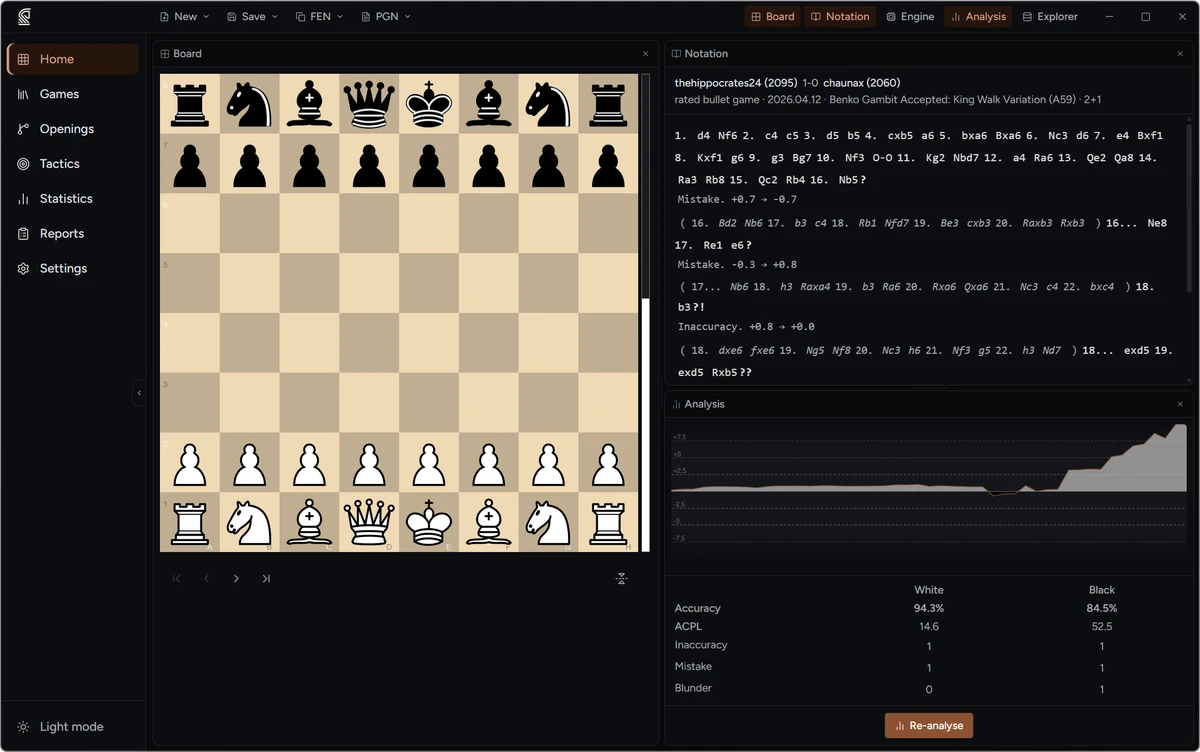
The Analysis panel is a dedicated workspace panel on the Home page. Add it via the panel toolbar if it is not already visible. After analysis completes it shows:
- Eval graph — a line chart of the engine evaluation at each move across the full game. Click any point on the graph to navigate to that position on the board.
- Accuracy — per-player accuracy percentage using the Lichess WDL formula.
- ACPL — average centipawn loss per player.
- Move counts — number of inaccuracies, mistakes, and blunders per player. Click a count to jump to the first move of that classification in the game.
A Re-analyse button at the bottom of the panel lets you rerun the engine on the current game.
What batch analysis unlocks
Section titled “What batch analysis unlocks”Running batch analysis on your games feeds several other features beyond the in-game annotations:
- Personal Statistics — accuracy over time, recurring blunder positions, luck rate, and opportunism rate are only computed from analysed games. See Personal Statistics.
- Personal Tactics — blunder (
??) and mistake (?) positions from analysed games become spaced repetition puzzles in your personal tactics pool. See Personal Tactics. - Opponent Preparation Report — blunder patterns and luck/opportunism stats in reports require games to be analysed. See Opponent Preparation.