Training Overview
Masterboard’s training system covers opening repertoire drilling with spaced repetition, personal tactics drilling from your own games, and Guess the Move. Endgame training is on the roadmap.
Opening repertoire drills
Section titled “Opening repertoire drills”The drill mode tests every move in your repertoire using the FSRS spaced repetition scheduler. The board shows a position from your repertoire and asks you to play the correct move. The app auto-plays the opponent’s response and then presents the next position.
Starting a session
Section titled “Starting a session”Drills are launched from the titlebar toolbar of the Openings workspace. The buttons follow your side-nav selection:
- Train All — drills due moves across every repertoire, both colours. Always available.
- Train White / Train Black — shown when a colour is selected in the side-nav; drills due moves across that colour’s repertoires.
- Train [repertoire name] — shown when a single repertoire is selected; drills due moves in that repertoire.
- Train branch — right-click any move in the tree (single-repertoire scope) to start a session scoped to that subtree.
Alongside each Train button is a matching Review button (Review All, Review White/Black, or Review [name]) that walks every move regardless of due dates — see Review mode below.
During a session
Section titled “During a session”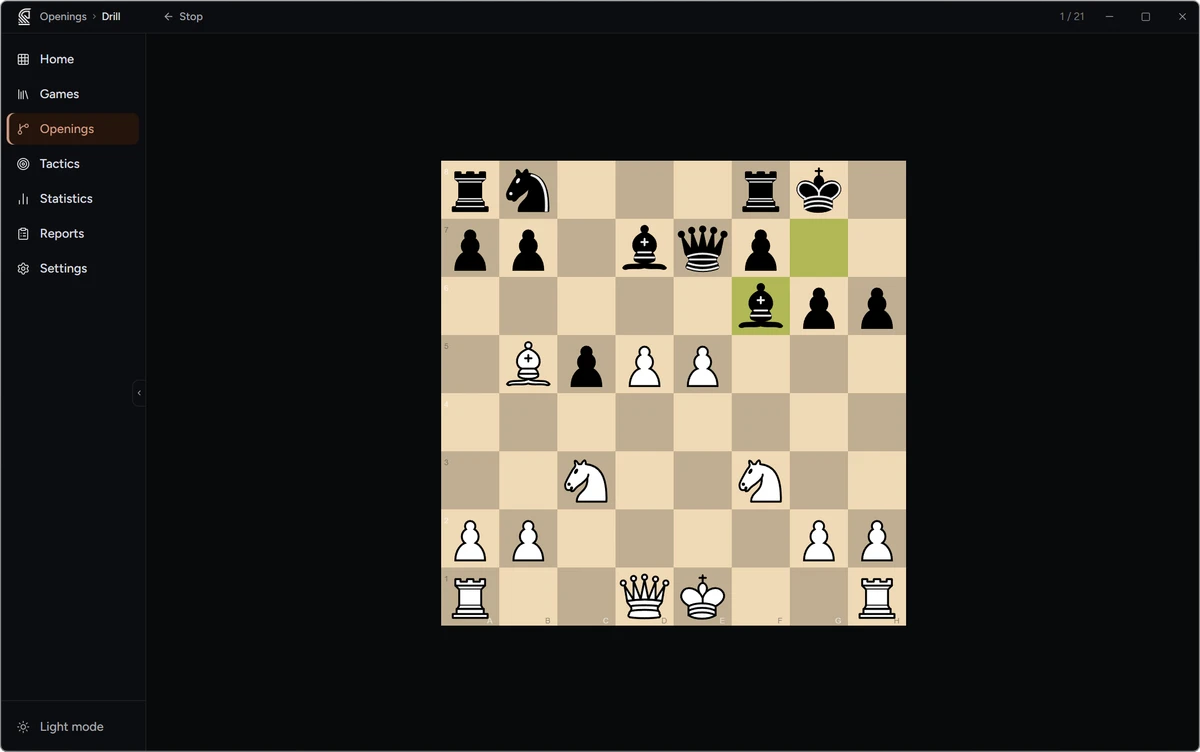
The drill board shows the position. The board is oriented to your colour for the current repertoire.
- Play the move you have prepared in your repertoire.
- If correct: a green feedback strip confirms the move. If the move has a comment or NAG symbol in your repertoire, it is shown in the strip. The opponent’s response is played automatically and the next position appears after a short pause.
- If incorrect: a red feedback strip shows the correct move(s), and green arrows highlight them on the board. Play the correct move to continue to the next position.
The titlebar shows your progress through the session.
Session summary
Section titled “Session summary”When all due cards are reviewed, the session ends and the completion screen shows how many moves you reviewed and your percentage correct. Stop (top-left) exits the session at any time and returns to the Openings workspace.
Review mode
Section titled “Review mode”The Review button walks the entire repertoire (or branch) in depth-first order, presenting every move regardless of SRS due dates. Use this to run through your full preparation the night before a tournament. The session ends when every move has been shown once — it does not loop, and it does not update the FSRS schedule (only the due-date drill does that).
Coverage heatmap
Section titled “Coverage heatmap”The Moves panel displays a small colour-coded dot next to each move based on its FSRS retrievability — the estimated probability that you would recall it correctly right now:
| Dot | Retrievability | Meaning |
|---|---|---|
| Green | ≥ 0.9 | Well retained |
| Yellow | 0.7–0.9 | Still being learned, or due soon |
| Red | < 0.7 | Lapsed, or overdue and weak |
| No dot | — | Never reviewed (new move) |
Use the heatmap to spot which branches need attention before a game, then right-click any move and select Train branch to drill that subtree directly.
Spaced repetition scheduling
Section titled “Spaced repetition scheduling”Masterboard uses the open-source FSRS v4 algorithm. Each move in your repertoire has its own card with tracked stability, difficulty, and review state. The scheduler computes the optimal review interval from the forgetting curve rather than a fixed doubling scheme.
- Correct answer (
Goodgrade): stability increases; the next interval grows according to your history with that specific move. - Incorrect answer (
Againgrade): the card lapses and re-enters the learning queue; the interval resets.
A move is “due” when its scheduled review date has arrived. The drill session collects all due moves and presents them in a single session. Moves answered incorrectly are immediately re-queued and will reappear before the session ends.
Guess the Move
Section titled “Guess the Move”Guess the Move is a training mode that lets you play through any saved game from your library and score your moves against the engine.
Open the Games page, right-click a game (or select one and use the Guess the Move toolbar button), and choose which side to play. The board is oriented to the colour you are guessing. For each move:
- Play the move you think was correct.
- The app scores your move. For an analysed game you earn 2 points for matching the engine’s best move, 1 point for a reasonable move, and 0 for a miss. For an un-analysed game, scoring is simply 1 point for the game move and 0 otherwise.
- The game’s actual move is shown if yours differed.
At the end of the game, a session summary shows your total score and percentage, and updates your Guess the Move Elo rating, which persists across sessions and improves as you consistently find strong moves.
Personal Tactics
Section titled “Personal Tactics”Masterboard can extract blunder and mistake positions from your batch-analysed games and queue them as FSRS-scheduled puzzles. See Personal Tactics for full details. Batch analysis must be run on your games first.
Planned training features
Section titled “Planned training features”The following training capability is on the roadmap and not yet available:
- Endgame training — curated endgame positions judged by the engine, with optional Syzygy tablebase verification for positions up to 5 pieces.
Opening deviation detection — finding where your games left prepared theory — is already live, surfaced on the Home page (notation badge and Analysis panel) and in the Openings workspace’s Deviations panel. See Personal Statistics.